Many courses include simulations of the IBM i environment. These may simulate either the IBM i text-based interface or a graphical user interface (GUI).
Simulations of the IBM i text-based interface will show "green screen" panels like the one below.
Sign On
                                               System  . . . . . :   MANTA1
                                               Subsystem . . . . :   QBASE
                                               Display . . . . . :   DSP05

                User  . . . . . . . . . . . . . .
                Password  . . . . . . . . . . . .
                Program/procedure . . . . . . . .
                Menu  . . . . . . . . . . . . . .
                Current library . . . . . . . . .


                                         (C) COPYRIGHT IBM CORP. 1980, 2007.
When you are directed to do so, select options, enter commands, and fill in the panels as you would on a real system.
On a real IBM i system, the data you enter on a panel is not evaluated until you press the Enter key. The entire panel of data is then processed. In contrast, during the simulations, your input is evaluated one field at a time, when you press the Enter key, a function key, or the Tab key. This lets us find and correct errors as soon as possible after you make them.
Some tasks within a simulation may require that you press a function key. For function keys F1 through F12, simply press the corresponding key on your PC keyboard.

For function keys F13 through F24, hold down the Shift key while you press F1 through F12. For example, you would press Shift-F2 if a task requires that you press F14.
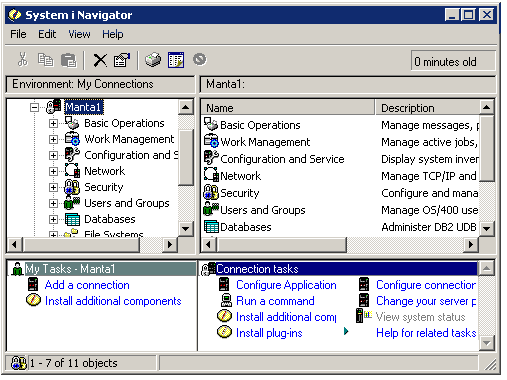
In addition to simulating IBM i green screens, many Manta courses simulate the graphical user interfaces (GUIs) provided by IBM i software, such as Access for i and Navigator for i.
As with other exercises, read the directions carefully and then perform the specified task. For example, given the screen below, the direction might be to expand the Basic Operations folder. You can accomplish this by using the left mouse button to click the plus sign in front of the folder name or to double-click the name itself.
Each click (or double click) of the mouse is considered an exercise "attempt." If you clicked the wrong area or used the wrong mouse button, you will receive a message telling you what you did wrong. As with other exercises, you can try again as often as necessary. If a Hint is available, read it before trying again. If you get stuck, you can click the Answer button to learn the correct response.
© 2011 Manta Technologies Inc.